 WhoIsCooking
Get the app, $5
WindowServer using high CPU on your Mac: what it is and how to fix it
WindowServer is the part of macOS that puts every pixel on your screens. When it's busy, the Mac gets warm and choppy.
What WindowServer is
WindowServer is a core macOS process. Every app hands it what it wants to show, and WindowServer composes that into the final image on each display. It's normal for it to use some CPU all the time; it's a problem when it sits high for long and the Mac gets warm or animations stutter.
What makes it busy
- External displays, especially more than one, very high resolutions, high refresh rates, or "scaled" resolutions that aren't the display's default. See MacBook hot with an external monitor.
- Lots of windows open across many desktops, particularly ones that redraw constantly (browsers with video, live dashboards, terminals with fast output).
- Transparency and motion: translucent menus and sidebars, animated wallpapers.
- Screen recording or sharing: Zoom/Teams screen share, OBS, screen recorders, and apps that capture the screen continuously.
- Window and menu bar utilities that hook into drawing (window managers, menu bar customisers, cursor effects).
How to bring it down
- Close windows and apps you aren't using, and tabs that play video.
- Set external displays to their default resolution (System Settings → Displays). Try 60 Hz instead of 120/144 Hz if you don't need it.
- Turn on Reduce transparency: System Settings → Accessibility → Display. Optionally Reduce motion too.
- Use a still wallpaper instead of an animated one.
- Quit screen recorders and screen-sharing when you're done with them.
- Temporarily quit window and menu bar utilities, one at a time, to see if one is the cause.
- Restart if it stays high with nothing open. Keep macOS updated; WindowServer fixes ship in updates.
Our own numbers
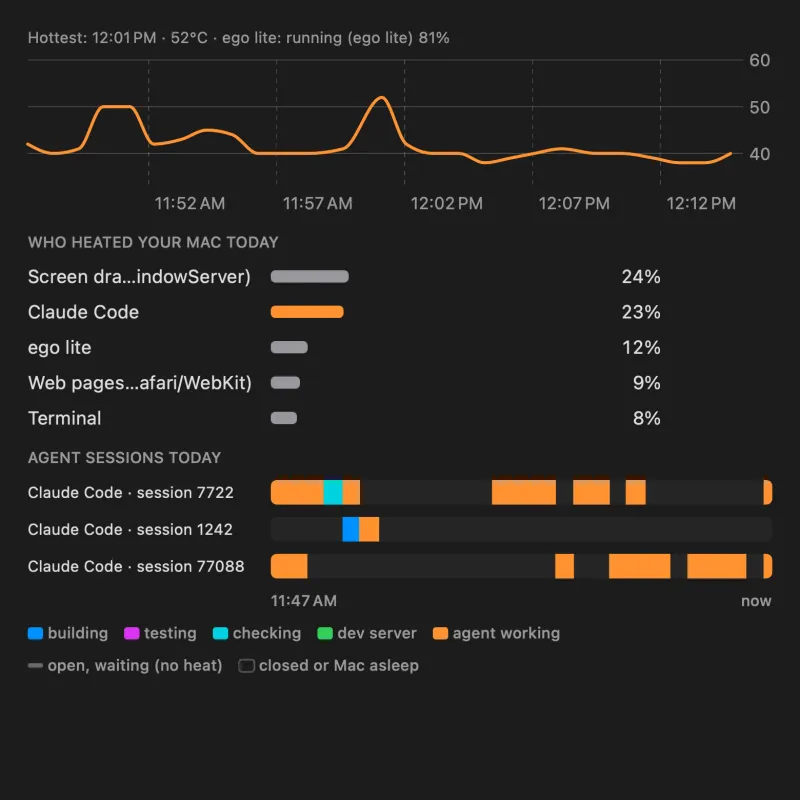
On our test Mac, WindowServer ("Screen drawing" in WhoIsCooking) was the single biggest share of CPU work over a half hour of light work: 24%, just ahead of Claude Code at 23%. That's normal for a Mac driving its screen while you work; it only becomes a heat problem when it climbs and stays high.
Frequently asked questions
Can I quit WindowServer?
No. Force-quitting it logs you out of your account and closes all apps. Lower its load instead.
Why does WindowServer use more CPU with an external monitor?
It has to draw a second, often larger, image. Scaled resolutions mean drawing at a higher resolution and shrinking it, which costs more.
Is WindowServer a virus?
No. It's a core part of macOS, signed by Apple.