 WhoIsCooking
Get the app, $5
How to cool down a hot Mac: 12 ways that work
From the 10-second fixes to the ones that let heavy work keep running cooler.
The fast fixes (under a minute)
1. Quit the app that is causing it
- Open Activity Monitor (press Cmd + Space, type "Activity Monitor").
- Click the CPU tab, then click the % CPU column so the busiest process is at the top.
- Watch it for a minute. A process that stays above 80 to 100% is what is making the heat. (100% means one full core, so 400% means four cores.)
- Check the Energy tab too. "Energy Impact" shows which apps use the most power over time, including ones that only spike now and then.
2. Get it off soft surfaces
Beds, sofas, blankets and laps block airflow. A desk is better; a laptop stand that lifts the back is better still, because air can move under the case.
3. Close tabs you are not using
Browser tabs with video, ads or web apps keep running in the background. Ten idle tabs can cost more CPU than the one you are looking at.
4. Turn off video call effects
Background blur and virtual backgrounds in Zoom, Teams and Meet use a lot of processing. Turning them off is one of the simplest heat savings for long calls.
Settings that help
5. Low Power Mode
Go to System Settings → Battery → Energy Mode and pick Low Power for "On Battery", "On Power Adapter" or both (macOS Sequoia 15.1 and later; on older versions it's a "Low Power Mode" menu with "Always", "Only on Battery" or "Only on Power Adapter"). Apple says it also reduces fan noise on Macs with fans. It lowers clock speeds and brightness. Everything still works, a bit slower, and it runs noticeably cooler and quieter.
6. Lower screen brightness and close extra displays
The display and GPU both add heat. External monitors at high or scaled resolutions make the GPU work harder.
7. Stop apps opening at login
System Settings → General → Login Items. Remove apps you do not need running all the time, and check "Allow in the Background" for helpers you do not recognise.
Fixes for heavy work you can't stop
8. Run heavy jobs on the efficiency cores
Every Apple Silicon Mac has performance cores (fast, hot) and efficiency cores (slower, cool). macOS runs background-priority work on the efficiency cores. You can start a job that way from Terminal:
taskpolicy -b ffmpeg -i input.mov output.mp4or move a running process with taskpolicy -b -p <PID>. The job keeps going, finishes later, and the chip runs cooler. In our test the same render ran at 64°C at full speed and 50°C on the efficiency cores. Details in how to cool a Mac without stopping your work.
9. Lower the parallelism
Many tools use every core by default. Fewer export threads, fewer test workers (--maxWorkers=2), or fewer build jobs (make -j2) means less heat, at the cost of time.
10. Don't run everything at once
An export plus a build plus a video call is three heavy loads stacked. Queue them.
Environment
11. Keep the room and the Mac out of the sun
Apple rates Macs for 10 to 35°C ambient. A hot room or a sunny window leaves less headroom, so the Mac throttles sooner.
12. Clean the vents (older Macs)
On Macs with fans, dust builds up over the years. Use a little compressed air at the vents with the Mac off. Do not open the case unless you know what you are doing; that can void the warranty.
What does not help
- "Cleaner" and "memory booster" apps. Freeing RAM does not reduce heat; the CPU work is what makes heat.
- Resetting the SMC on Apple Silicon. M-series Macs have no SMC reset. A restart does the same job.
- Fan control apps on a MacBook Air. It has no fan.
A one-click way
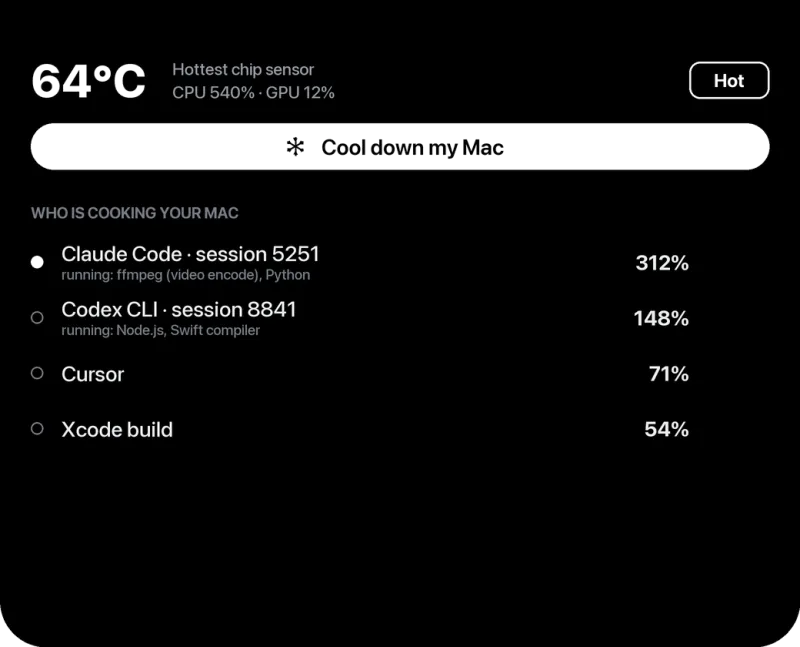
WhoIsCooking is a small menu bar and notch app ($5, Apple Silicon) that shows your chip temperature, which app is heating the Mac, and has a Cool down my Mac button that moves every busy process to the efficiency cores and keeps catching new ones until you press Full speed.
Frequently asked questions
What is the fastest way to cool down a MacBook?
Quit the app using the most CPU in Activity Monitor and put the Mac on a hard surface or stand. Turning on Low Power Mode helps within a minute or two.
Does a cooling pad help a MacBook?
A little. A stand that raises the Mac helps airflow. Pads with fans help a MacBook Pro's intake somewhat and help a fanless MacBook Air by cooling the case. Finding and stopping the hot process does much more.
Does Low Power Mode reduce heat on a Mac?
Yes. It lowers the chip's clock speed and screen brightness, which cuts power and heat. Work still runs, just slower.
Should I put my MacBook in the fridge or on ice?
No. Rapid cooling can cause condensation inside the Mac. Use airflow and a cooler room instead.